
IDPhotoSize
Official ID Photo Resizer — Free, instant & private. Your photo never leaves your device.
Give your photo the identity it deserves!
Compress Your Photo for Online Applications
Government portals, visa application systems, and recruitment boards each enforce strict file size ceilings — commonly 20KB, 50KB, 100KB, 200KB, or 500KB. Uploading an oversized image often results in instant form rejections or submission timeouts. This tool allows you to target any exact file size in seconds while preserving facial clarity, all processed 100% privately on your device.
Drop your photo here
or click to browse — JPG, PNG, WEBP
Your photo never leaves your device
Related Tools
Photo Requirements
- Target file size: Select preset targets (20KB, 50KB, 100KB, 200KB, 500KB, 1MB, 2MB) or set custom KB
- Recommended format: JPEG (.jpg) for optimal compression ratio and maximum portal compatibility
- Supported inputs: JPEG, PNG, WEBP, and camera photos from any smartphone or scanner
- Common application caps: Indian SSC/UPSC (50KB), US DV Lottery (240KB), Schengen Visa (100–200KB)
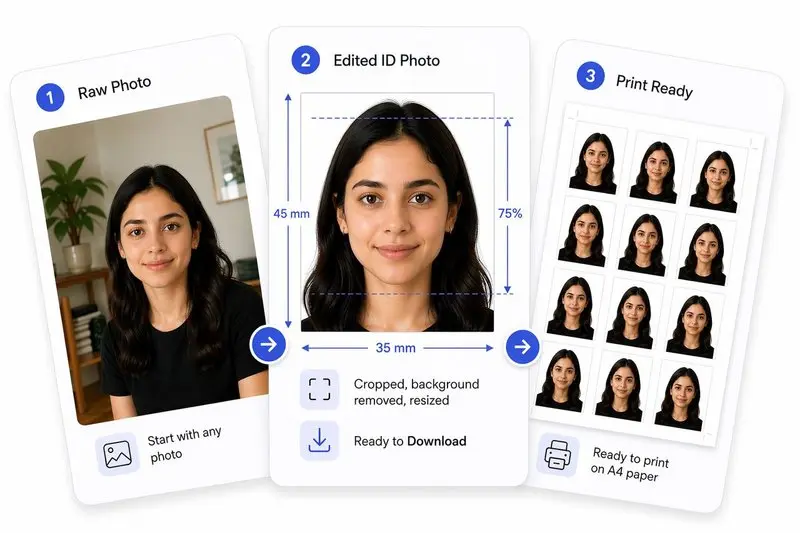
Your Photo, Done Right
Prepare Your Photo in 2 Steps
Upload Your Photo
Upload any photo — we'll detect your face automatically.
Hit Your File Size & Download
Set a target size (e.g. 50 KB) and download the compressed photo instantly.
How to Use This Tool
- Upload your photo (JPG, PNG, or WEBP) from your phone, camera, or computer.
- Select your target file size from the quick-select buttons or enter a custom KB limit.
- Optionally use the crop tool to frame your face or adjust dimensions to passport specifications.
- Review the live preview to verify facial sharpness and resolution.
- Click Apply, then Download your optimized, submission-ready image.
Frequently Asked Questions
- What file size do Indian recruitment portals (SSC, UPSC, IBPS, SBI) require?
- Central and state government exam portals across India (including SSC CGL, UPSC Civil Services, IBPS PO, and SBI Clerk) typically mandate a photograph file size between 20KB and 50KB in JPEG format, with dimensions around 3.5×4.5 cm (200×230 pixels). Scanned signatures are usually restricted to 10KB–20KB.
- What are the file size rules for the US Diversity Visa (DV) Lottery and DS-160?
- The US State Department requires digital photos for the DV Lottery and DS-160 visa application to be square (minimum 600×600 px up to 1200×1200 px), in JPEG format, and strictly under 240KB. Compressing your photo to 200KB provides an optimal buffer while maintaining maximum biometric recognition accuracy.
- What file size do Schengen visa and European consulates require?
- Online Schengen visa application forms and appointment portals (such as VFS Global, TLScontact, and BLS International) generally accept passport photos between 50KB and 200KB. Ensure the photo maintains a 35×45mm aspect ratio with a clean light grey or white background.
- Why should I use JPEG instead of PNG for online applications?
- JPEG uses lossy compression specifically tuned for human photographic portraits, allowing an 8MB camera capture to compress down to 50KB with clear facial features. PNG is a lossless format designed for graphics, resulting in file sizes 5× to 10× larger for the same resolution, which frequently exceeds portal limits.
- Will compressing my photo make it blurry or cause it to get rejected?
- Our compression engine intelligently balances pixel dimensions with quantization matrices. It preserves high-frequency edge detail around the eyes, nose, and jawline while compressing uniform background areas, ensuring the image remains crisp and compliant with automated biometric scanners.
- Is my photo secure when using this tool?
- Yes, 100% private. All image compression and resizing execute directly inside your web browser's memory using modern client-side Canvas and WebAssembly technologies. Your photo is never uploaded to any remote server or cloud database.
Need a different size or country?
Open the Full ID Photo Tool — 30+ Sizes