
IDPhotoSize
Official ID Photo Resizer — Free, instant & private. Your photo never leaves your device.
Give your photo the identity it deserves!
Get Your Malaysia eVisa Photo in the Exact 35×50 mm Size
Malaysia eVisa, eNTRI, and consular visa applications require a 35×50 mm photo with a plain white background. Crop, align, and remove background instantly on your device to meet Immigration Department of Malaysia guidelines.
Select photo size
35×50 mm, white background (eVisa / Immigration)
Drop your photo here
or click to browse — JPG, PNG, WEBP
Your photo never leaves your device
Related Tools
Photo Requirements
- Dimensions: 35 mm width × 50 mm height (3.5 × 5.0 cm)
- Digital Resolution: 413 × 591 pixels at 300 DPI
- Background: Plain white background without shadows, patterns, or gradients
- Head Proportion: Head height from chin to top of hair should occupy 30–35 mm (60–70% of frame)
- Top Margin: Approximately 5 mm space from the top of hair to the photo top edge
- Expression: Neutral face, mouth closed, direct gaze into camera lens
- Attire: Dark clothing covering shoulders and chest to ensure clear contrast against the white background
- Eyewear: Eyeglasses must be removed to prevent reflection, glare, or frame obstruction
- File Size Limit: Standard eVisa portal uploads typically require JPEG files between 10 KB and 350 KB
- No Selfies: Professional or tripod-mounted portraits recommended to prevent angle distortion
- Taken within the last 6 months
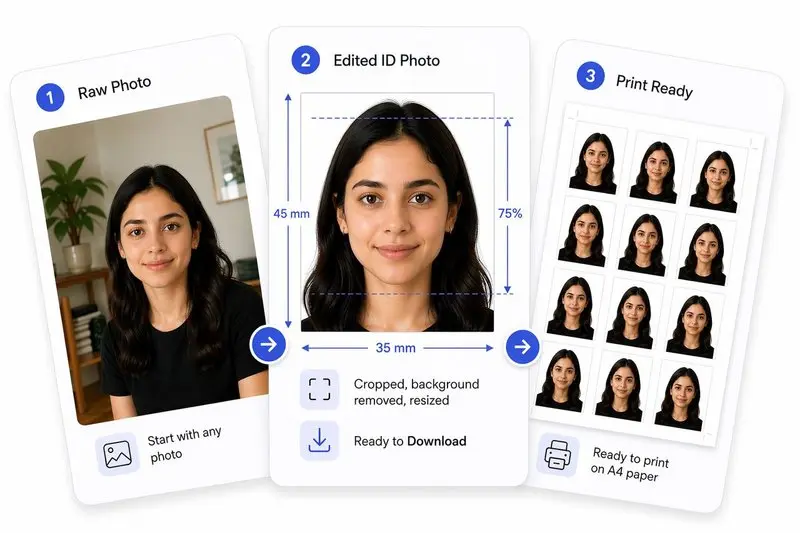
Your Photo, Done Right
Prepare Your Photo in 3 Steps
Upload Your Photo
Upload any photo — we'll detect your face automatically.
Adjust in One Tap (or Fine-Tune)
Use Auto Ready to quickly centre, align, crop, and clean the background. Prefer more control? Adjust everything yourself anytime.
Download & Use Anywhere
Download your photo for online use, or arrange it on a sheet for easy printing.
How to Use This Tool
- Upload a front-facing photo taken in good lighting.
- Adjust the crop frame so your head fills 60–70% of the 35×50 mm canvas.
- Use Center Face to center your portrait and Straighten to level any head tilt.
- Click Apply to process your crop.
- Click Remove Background to replace any background with compliant solid white.
- Review the Photo Analysis panel to confirm biometric alignment and expression compliance.
- Download your Malaysia eVisa-ready photo in JPEG format.
Frequently Asked Questions
- What size is a Malaysia visa photo?
- The official Malaysia visa and eVisa photo size is 35 mm wide by 50 mm high (3.5 × 5.0 cm), or 413 × 591 pixels at 300 DPI.
- Is Malaysia visa photo size the same as Singapore visa photo size?
- No. Singapore visa photos are 35×45 mm, whereas Malaysia visa photos are 35×50 mm (5 mm taller). Submitting a 35×45 mm photo to Malaysia may lead to delays or rejection.
- What is the maximum file size for Malaysia eVisa upload?
- The official Malaysia eVISA portal (malaysiavisa.imi.gov.my) generally requires photos between 10 KB and 350 KB in JPEG format. You can use our target file size options to meet this requirement.
- Can I wear a hijab or headscarf for a Malaysia visa photo?
- Yes. Religious head coverings (such as a hijab or tudung) are fully permitted as long as the entire face from chin to forehead is visible without casting shadows on the face.
- What background colour is required for Malaysia eVisa?
- A pure white background is required for all tourist eVisa applications. Use our 1-click background removal tool to achieve a clean white backdrop.
- Can I wear glasses for my Malaysia visa photo?
- Glasses should be removed. Frames and reflections on lenses are among the most common reasons for automated eVisa photo rejection.
Need a different size or country?
Open the Full ID Photo Tool — 30+ Sizes