
IDPhotoSize
Official ID Photo Resizer — Free, instant & private. Your photo never leaves your device.
Give your photo the identity it deserves!
Singapore Visa Digital Photo – 400×514 px
Singapore visa applications submitted via ICA eService require a digital photo at exactly 400×514 pixels with a plain white background. This free tool prepares your photo to the exact ICA digital specifications — completely on your device.
Select photo size
400×514 px, white background (ICA Digital)
Drop your photo here
or click to browse — JPG, PNG, WEBP
Your photo never leaves your device
Related Tools
Photo Requirements
- Dimensions: 400 × 514 pixels (digital)
- Background: Plain white with no shadows, patterns, or borders
- Expression: Neutral, mouth closed, eyes looking directly at the camera
- Head Position: Centered, facing forward, full head and shoulders visible
- File Format: JPEG, no larger than 2 MB
- Photo taken within the last 3 months
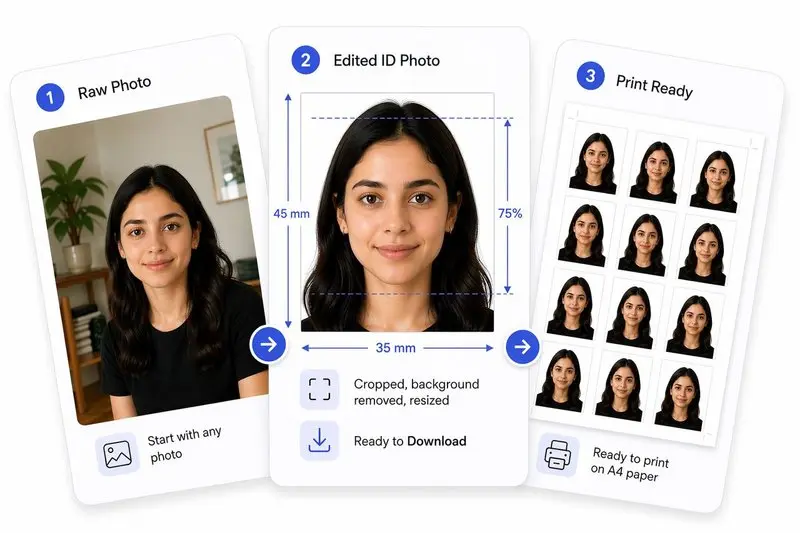
Your Photo, Done Right
Prepare Your Photo in 3 Steps
Upload Your Photo
Upload any photo — we'll detect your face automatically.
Adjust in One Tap (or Fine-Tune)
Use Auto Ready to quickly centre, align, crop, and clean the background. Prefer more control? Adjust everything yourself anytime.
Download & Use Anywhere
Download your photo for online use, or arrange it on a sheet for easy printing.
How to Use This Tool
- Upload a clear, front-facing photo with good lighting.
- Zoom and move in until the face oval guide aligns with your face.
- Click Center Face to auto-center the crop, then Straighten to level your eyes.
- Make final adjustments — drag the image and fine-tune the tilt if needed.
- Click Apply, then optionally Remove Background for a clean white backdrop.
- Open the Photo Analysis panel — it checks eyes, expression, and head alignment with correction hints before you upload your digital visa photo.
- Download your Singapore visa-ready photo at 400×514 px.
Frequently Asked Questions
- What pixel dimension is required for Singapore digital visa photo?
- ICA eService requires exactly 400×514 pixels for digital visa photo uploads.
- Can I use this for ICA pass applications?
- Yes. All ICA digital photo submissions use the same 400×514 pixel specification.
- Is this tool free?
- Completely free. Nothing leaves your device.
Need a different size or country?
Open the Full ID Photo Tool — 30+ Sizes