
IDPhotoSize
Official ID Photo Resizer — Free, instant & private. Your photo never leaves your device.
Give your photo the identity it deserves!
Compress Your Photo to Under 50KB
A 50KB file size ceiling is the single most common upload requirement across major national competitive exams, banking portals, and government job boards (including UPSC, SSC CGL/CHSL/MTS, IBPS, SBI, and State PSCs). This tool compresses your photo to stay strictly under 50KB without sacrificing critical facial details — running entirely on your device.
Drop your photo here
or click to browse — JPG, PNG, WEBP
Your photo never leaves your device
Related Tools
Photo Requirements
- Output file size: Strictly under 50KB (recommended target: 40KB–48KB)
- Recommended format: JPEG (.jpg / .jpeg)
- Standard dimensions: 3.5×4.5 cm (200×230 pixels to 413×531 pixels at 300 DPI)
- Applicable portals: UPSC Online, SSC, IBPS PO/Clerk, SBI Recruitment, NDA, CDS, State PSC applications
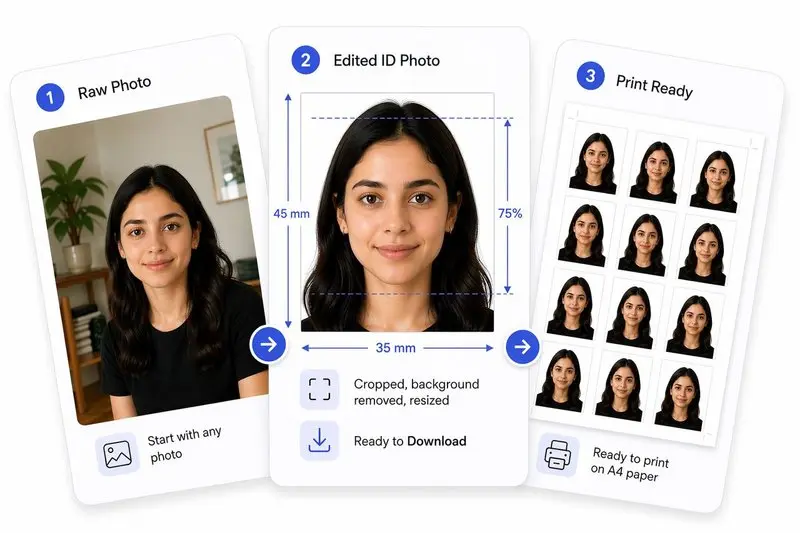
Your Photo, Done Right
Prepare Your Photo in 2 Steps
Upload Your Photo
Upload any photo — we'll detect your face automatically.
Hit Your File Size & Download
Set a target size (e.g. 50 KB) and download the compressed photo instantly.
How to Use This Tool
- Upload your photo (JPG, PNG, or WEBP) from your mobile or desktop.
- The tool automatically pre-sets the compression engine to target 50KB.
- Optionally crop to standard 3.5×4.5 cm (or passport aspect ratio) to align the face oval.
- Preview the compressed output to ensure eye clarity and neutral expression.
- Click Apply, then Download your 50KB compliant image.
Frequently Asked Questions
- Which specific competitive exam and government portals require photos under 50KB?
- Staff Selection Commission (SSC CGL, CHSL, MTS, GD), Union Public Service Commission (UPSC Civil Services, NDA, CDS), Institute of Banking Personnel Selection (IBPS PO, Clerk, SO), State Bank of India (SBI PO/Clerk), Railway Recruitment Board (RRB NTPC), and virtually all State Public Service Commissions mandate passport photos capped at 50KB.
- What are the recommended pixel dimensions for a 50KB photo?
- Most 50KB portals specify dimensions of 3.5 cm width × 4.5 cm height, which corresponds to 132×170 pixels at 96 DPI, 200×230 pixels for standard web forms, or 413×531 pixels at full 300 DPI. For the sharpest result at 50KB, resizing to 300×380 or 413×531 px before JPEG compression is ideal.
- Why does the portal say 'File size must be between 20KB and 50KB'?
- Many recruitment servers reject both oversized and undersized files. An image below 20KB often lacks sufficient pixel resolution for biometric verification, while an image over 50KB exceeds database storage quotas. This tool targets a safe sweet spot around 40KB–48KB to satisfy both boundaries.
- How can I avoid blurry face details when compressing to 50KB?
- Crop the photo close to the face and shoulders first before applying compression. By eliminating unnecessary background space, more JPEG compression bytes are allocated to the eyes, nose, and mouth, ensuring facial details stay crisp.
- Can I compress both photos and scanned signatures to 50KB?
- Yes. While signatures are frequently capped even smaller (typically 10KB–20KB), this tool handles both portrait photos and signature crops seamlessly. For signatures, ensure the scan has high contrast with a clean white paper background.
- Is this tool free and secure for official documents?
- Completely free with zero cloud uploads. Your biometric photos never leave your device, ensuring complete privacy and compliance with data protection standards.
Need a different size or country?
Open the Full ID Photo Tool — 30+ Sizes