
IDPhotoSize
Official ID Photo Resizer — Free, instant & private. Your photo never leaves your device.
Give your photo the identity it deserves!
Resize Your Signature for Online Applications
Many job portals and government application forms require a scanned signature in specific dimensions and under a file size limit. Upload your signature image, remove the paper background in one click, and download a clean, correctly sized JPEG — all on your device.
Select photo size
8×3 cm, standard document signature size
Drop your photo here
or click to browse — JPG, PNG, WEBP
Your photo never leaves your device
Related Tools
Photo Requirements
- Dimensions: 80×30mm (8×3cm) at 200 DPI — equals 630×236 px
- File size: typically under 50KB (check your portal)
- Format: JPEG
- White background, no shadows
- Signature must be fully visible and legible within the frame
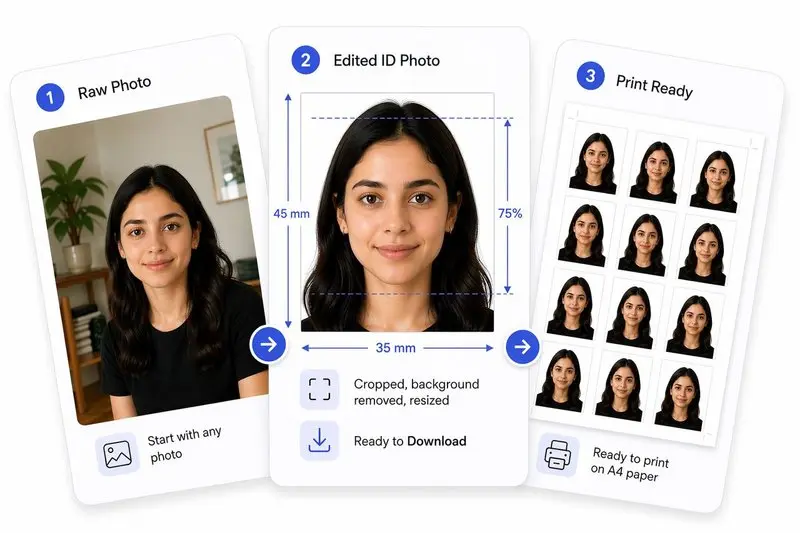
Your Photo, Done Right
Prepare Your Photo in 3 Steps
Upload Your Photo
Upload any photo — we'll detect your face automatically.
Adjust in One Tap (or Fine-Tune)
Use Auto Ready to quickly centre, align, crop, and clean the background. Prefer more control? Adjust everything yourself anytime.
Download & Use Anywhere
Download your photo for online use, or arrange it on a sheet for easy printing.
How to Use This Tool
- Sign clearly on plain white paper using black or dark blue ink.
- Photograph in good natural light — avoid shadows falling across the ink — or use a flatbed scanner.
- Upload the image here.
- Drag the crop handles so the signature fills most of the frame with a small even margin on each side.
- Click Remove Background — the tool detects the ink automatically and replaces the paper colour with clean white, correcting uneven lighting and yellowed paper.
- Click Apply — the image is resized to 80×30mm at 200 DPI and compressed to meet the target file size.
- Download the ready-to-upload signature JPEG.
Frequently Asked Questions
- What size should my signature be for an online application?
- Requirements vary by portal. The most common general format is 80×30mm (8×3cm). Indian government portals (SSC, UPSC, Railways, Banking) typically require 3.5×1.5cm. Always check your specific portal’s instructions before uploading.
- How do I photograph or scan my signature?
- Sign on plain white A4 paper with a black or dark-blue pen. Place the paper flat and photograph from directly above in bright, even light — avoid angling the camera, which causes shadows. A flatbed scanner gives the cleanest result. Upload the full-page photo; the crop tool handles the rest.
- How does background removal work for signatures?
- The tool uses an adaptive contrast algorithm designed for ink on paper. It analyses each pixel’s brightness relative to its local surroundings, keeps ink pixels, and replaces the paper background — including uneven shadows or a yellowish tint — with clean white. No deep-learning model is used, so it runs instantly even on a slow connection.
- My scan has yellow paper or uneven shadows — will background removal fix it?
- Yes. The adaptive approach compares each pixel to its neighbours rather than using a fixed white threshold, so it handles off-white, cream, or unevenly lit paper well. Most phone photos of a signature come out clean after one click.
- Should the background be white or transparent?
- Almost all government and job portals expect a JPEG with a white background. Transparent backgrounds require PNG format, which most portals do not accept for signatures. Use Remove Background and keep the output as JPEG with white fill.
- What if my portal requires a different dimension?
- Select the custom size option before applying. Enter the exact width and height your portal specifies (in mm, cm, or px), set the file size limit, and click Apply.
- What pixel dimensions is 80×30mm at 200 DPI?
- At 200 DPI, 80mm = 630 px and 30mm = 236 px, giving a final image of 630×236 pixels. The tool sets this automatically when you use the General Signature preset.
- Is this free?
- Completely free, no account needed. Your image is processed entirely on your device and is never uploaded to any server.
Need a different size or country?
Open the Full ID Photo Tool — 30+ Sizes